
Every computer, smartphone, or tablet relies on an operating system (OS) to function seamlessly. When your computer slows down or apps refuse to open, the culprit is often the operating system. Understanding what an operating system does can give you insights into how it manages memory, programs, and files, ultimately making your devices faster and more efficient.
Read More: https://newsokay.com/revolutionary-middleware-software-empowering/
Table of Contents
- What is an Operating System in a Computer?
- Types of Operating Systems
- Core Functions of an Operating System
- Popular Examples of Operating Systems
- Key Components of an Operating System
- Advantages of Using an Operating System
- Disadvantages of Using an Operating System
- Conclusion
- FAQs About Operating Systems
What is an Operating System in a Computer?
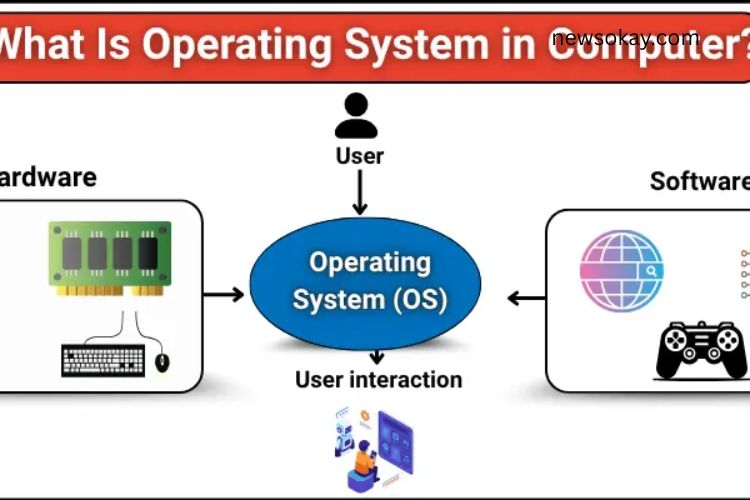
An operating system is the central software that brings a computer to life. It acts as a bridge between the hardware and applications, ensuring they work together efficiently. The OS manages your files, memory, and programs while providing a user-friendly interface for interaction. Without an operating system, your computer would be unable to perform even the simplest tasks.
Think of it like the conductor of an orchestra, coordinating every instrument (hardware) to create harmony, allowing you to interact with the music (software) effortlessly.
Types of Operating Systems
Operating systems vary in functionality and purpose. Here are the main types you should know:
- Batch Operating System – Processes tasks in batches without requiring user interaction. It is mostly used in mainframes for repetitive jobs.
- Time-Sharing / Multitasking OS – Allows multiple users or programs to run simultaneously, maximizing efficiency.
- Distributed Operating System – Manages a network of computers as a single system, sharing resources and workloads.
- Real-Time OS (RTOS) – Provides instant responses, crucial for devices that demand immediate action like medical or industrial equipment.
- Network Operating System – Enables multiple computers to communicate, share resources, and maintain security over a network.
- Mobile Operating System – Powers smartphones and tablets, managing apps, hardware, and touch interfaces efficiently.
Core Functions of an Operating System
Operating systems perform several essential functions to keep computers and devices running smoothly:
- Hardware Management – Controls CPU, memory, storage, and peripherals like printers and keyboards.
- Software Management – Runs programs efficiently, ensuring multiple applications can operate simultaneously without conflict.
- File Management – Organizes, stores, retrieves, and secures files for easy access.
- Security and Access Control – Protects your device from unauthorized access, malware, and other security threats.
By handling these tasks, the OS ensures that users experience smooth and uninterrupted performance.
Popular Examples of Operating Systems
Operating systems are everywhere, powering desktops, laptops, tablets, and smartphones. Here are the most widely used:
- Windows – A versatile OS popular for home and office use. It allows easy access to applications, games, and productivity tools.
- macOS – Exclusive to Apple computers, known for its smooth performance and seamless integration with Apple hardware.
- Linux – A free, open-source OS widely used in servers and technical environments.
- Android – Powers most smartphones and tablets, enabling app management and hardware control.
- iOS – Apple’s mobile OS, renowned for stability, security, and smooth app performance on iPhones and iPads.
Each OS has its unique features, advantages, and ideal use cases, making it important to choose one based on your device and needs.
Key Components of an Operating System
The OS comprises several integral components, each critical for smooth operation:
- Kernel – The core component controlling hardware and system resources.
- Shell – Provides an interface for users to communicate with the OS through commands.
- File System – Organizes and manages all files on the device, ensuring quick access and secure storage.
- Device Drivers – Enable the OS to communicate effectively with hardware like printers, keyboards, and graphics cards.
These components work together seamlessly to create a stable, user-friendly environment for running software.
Advantages of Using an Operating System
An operating system brings numerous benefits, making devices more accessible and efficient:
- User-Friendly Interface – Simplifies interaction with hardware and software.
- Efficient Resource Management – Optimizes CPU, memory, and storage for smooth performance.
- Multitasking Capability – Allows multiple programs to run concurrently without conflicts.
- Data Protection and Security – Shields your files and applications from unauthorized access.
- Seamless Application Performance – Ensures apps operate reliably and efficiently.
With these advantages, the OS is indispensable for anyone who wants to maximize the functionality of their devices.
Disadvantages of Using an Operating System
Despite their many benefits, operating systems have some limitations:
- Cost – Premium OS versions can be expensive.
- Updates – Frequent updates can slow down older devices.
- Software Compatibility – Some OS may not support certain programs.
- Security Vulnerabilities – OS can be targeted by viruses and malware.
- Maintenance – Requires periodic updates and monitoring to ensure optimal performance.
- Hardware Limitations – Not all OS are compatible with every device.
Understanding these limitations can help users manage expectations and maintain their devices effectively.
Frequently Asked Questions:
What is a computer operating system?
A computer operating system (OS) is software that manages hardware, runs programs, organizes files, and provides an interface for users to interact with the device.
Why is learning about operating systems important?
Understanding an OS helps you troubleshoot issues, improve computer performance, and make informed choices about software and devices.
What are the main types of operating systems?
The main types include Batch OS, Time-Sharing/Multitasking OS, Distributed OS, Real-Time OS, Network OS, and Mobile OS. Each type serves different purposes.
Which operating system is best for beginners?
Windows is widely recommended for beginners due to its user-friendly interface and extensive software support, while macOS offers a smooth experience for Apple users.
Can a computer function without an operating system?
No. Without an OS, a computer cannot process tasks, run applications, or interact with hardware effectively.
What are the key functions of an operating system?
An OS manages hardware resources, runs software, organizes files, ensures security, and provides a user-friendly interface for interaction.
What are examples of popular operating systems?
Some popular OS include Windows, macOS, Linux, Android, and iOS, each designed for different devices and user needs.
Conclusion
Operating systems are the backbone of every computing device, enabling hardware and software to work together seamlessly. They manage memory, run programs, organize files, and provide a user-friendly interface that makes technology accessible to everyone. By understanding the different types of operating systems, their core functions, and their advantages and limitations, you can make smarter choices for your devices and enhance your overall computing experience. Whether you are a beginner exploring Windows, an Apple enthusiast using macOS, or a tech professional experimenting with Linux, mastering the essentials of operating systems empowers you to troubleshoot issues, improve performance, and unlock the full potential of your technology. With the right knowledge, navigating the digital world becomes faster, easier, and far more productive.