
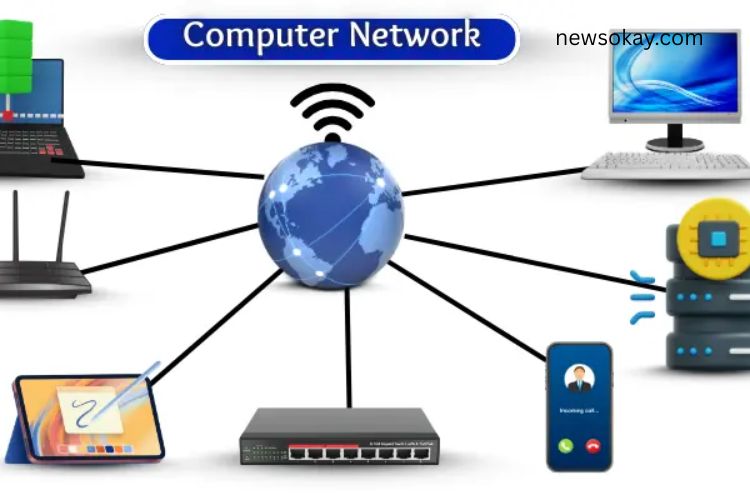
Slow file transfers, frequent disconnections, and poor communication can disrupt both work and personal activities. A solid understanding of computer networks can solve these issues. A computer network connects devices, enabling them to share data, resources, and information seamlessly. With the right setup, networks improve speed, connectivity, and efficiency across devices.
Read More: https://newsokay.com/ai-and-global-influence-celebrities-politics-and-the-digital-era/
What Is a Computer Network?
A computer network links two or more devices to share information and resources. Connections can be wired, like Ethernet cables, or wireless, such as Wi-Fi. Networks allow devices to send and receive data quickly and enable shared access to resources like printers, files, and the internet. Essentially, a computer network allows devices to communicate and collaborate efficiently.
Importance of Computer Networks
Computer networks are vital in today’s digital world. They streamline communication, enhance productivity, and reduce costs. Key reasons why networks matter include:
- Quick File Sharing: Transfer data between devices instantly.
- Connectivity: Link multiple computers for smooth collaboration.
- Shared Resources: Access printers, scanners, and internet connections collectively.
- Time and Cost Efficiency: Reduce the need for duplicate resources.
- Enhanced Learning and Work: Support online education, remote work, and entertainment.
A robust network ensures that information flows seamlessly, making everyday digital tasks faster and more reliable.
How Does a Computer Network Work?
Computer networks work by connecting devices to share data and resources. Here’s a simplified breakdown:
- A device, such as a laptop or smartphone, sends data.
- The data is split into small units called packets.
- Packets travel through cables or wireless signals.
- Network devices like routers and switches direct the packets to the correct destination.
- The receiving device reassembles the packets into the original data.
- Users receive files, messages, or webpages instantly.
This system ensures fast and accurate communication between devices, regardless of distance.
Types of Computer Networks
Networks vary in scale and purpose. Understanding their types helps select the right one for a given scenario.
- LAN (Local Area Network): Connects devices in a small area, such as homes, schools, or offices.
- WAN (Wide Area Network): Covers large distances, connecting multiple cities or countries.
- MAN (Metropolitan Area Network): Serves an entire city or a large campus.
- PAN (Personal Area Network): Links personal devices like smartphones, laptops, and tablets.
- CAN (Campus Area Network): Connects multiple buildings within a campus or corporate environment.
Each network type serves unique needs, from personal use to large organizational setups.
Components of a Computer Network
A network functions efficiently due to several key components:
- Router: Directs data between different networks.
- Switch: Connects devices within the same network.
- Hub: Shares data to all devices in a local network.
- Modem: Links the network to the internet.
- Network Interface Card (NIC): Enables devices to connect to the network.
- Cables: Physically transfer data between devices.
- Access Point: Connects wireless devices to the network.
- Server: Stores and manages shared data.
- Client: A device that uses network resources.
Each component plays a critical role in maintaining network stability, speed, and security.
Computer Network Protocols
Network protocols are rules that govern communication between devices, ensuring accurate and secure data transfer. Common protocols include:
- TCP/IP: Breaks data into packets and ensures delivery.
- HTTP/HTTPS: Transfers web pages securely over the internet.
- FTP: Moves files between computers.
- SMTP/POP3/IMAP: Handles sending and receiving emails.
- DNS: Translates domain names into IP addresses.
- SSH: Provides secure remote access.
- UDP: Delivers data quickly without error checking.
Protocols make networks reliable and ensure seamless interaction between diverse devices.
Computer Network Topologies
Network topology defines how devices are arranged and how data flows between them. Popular topologies include:
- Bus Topology: Devices share a single communication line.
- Star Topology: Each device connects to a central hub or switch.
- Ring Topology: Devices form a circular network, passing data sequentially.
- Mesh Topology: Every device links directly to all others for maximum redundancy.
- Tree Topology: Devices are arranged hierarchically, like branches of a tree.
- Hybrid Topology: Combines two or more layouts for flexibility.
Choosing the right topology impacts network performance, scalability, and fault tolerance.
Applications of Computer Networks
Networks power nearly every aspect of modern life:
- File Sharing: Quickly exchange documents, images, and videos.
- Internet Access: Connect to websites and cloud services.
- Email & Messaging: Communicate instantly across distances.
- Online Learning: Access courses, lectures, and study materials remotely.
- Video Conferencing: Conduct meetings virtually with real-time interaction.
- Online Banking: Perform secure transactions from anywhere.
- Entertainment: Stream movies, music, and online games.
- Remote Work: Access office systems and collaborate from home.
- Cloud Services: Store and manage data online efficiently.
- E-Commerce: Facilitate online buying and selling globally.
The versatility of networks ensures they are indispensable in personal, educational, and business contexts.
Advantages of Computer Networks
Computer networks provide numerous benefits:
- Fast Communication: Share information instantly.
- Resource Sharing: Use printers, internet, and storage collectively.
- Remote Access: Connect to files and systems from any location.
- Data Backup: Store and protect important information.
- Team Collaboration: Work on projects efficiently across multiple devices.
Disadvantages of Computer Networks
Despite their advantages, networks come with challenges:
- Security Risks: Vulnerable to hacking and unauthorized access.
- Viruses & Malware: Threaten connected devices.
- Network Failures: Interrupt access and communication.
- Setup Costs: Installing and maintaining a network can be expensive.
- Maintenance Needs: Regular monitoring and updates are essential.
- Data Loss Risk: Failure without proper backup can result in lost information.
- Limited Range: Some networks, like LANs and PANs, cover only short distances.
Frequently Asked Questions:
What does “Mastering Computer Networks” mean?
Mastering computer networks means understanding how devices connect, communicate, and share resources efficiently. It involves learning network types, components, protocols, and topologies to optimize performance and security.
Why is connectivity important in a computer network?
Connectivity ensures that devices can communicate seamlessly, share files, access the internet, and collaborate in real-time. Strong connectivity improves speed, reduces downtime, and enhances productivity.
How can computer networks boost innovation?
Networks enable faster information exchange, remote collaboration, cloud computing, and access to advanced digital tools. These capabilities help businesses, schools, and individuals innovate without geographical limits.
How do protocols enhance network performance?
Protocols like TCP/IP, HTTP/HTTPS, and FTP provide rules for data transmission, ensuring accurate, fast, and secure communication between devices. Without protocols, networks would be unreliable and inefficient.
What is the role of network topologies in communication?
Topologies define how devices are connected and how data flows. Choosing the right topology—star, mesh, ring, or hybrid—affects speed, redundancy, and fault tolerance in a network.
Can computer networks be secure?
Yes. Security measures like firewalls, encryption, VPNs, and access control protect networks from cyber threats, malware, and unauthorized access. Mastering these measures ensures safe and reliable networking.
Conclusion
Mastering computer networks is no longer optional—it’s essential in today’s connected world. Networks unlock seamless communication, efficient data sharing, and powerful collaboration across devices, locations, and industries. By understanding network types, components, protocols, and topologies, you gain the ability to optimize connectivity, enhance security, and drive innovation. Whether for personal use, business operations, or global enterprises, strong networks save time, reduce costs, and open new opportunities for learning, creativity, and productivity. While challenges like security risks and maintenance exist, mastering the fundamentals ensures you can leverage networks safely and effectively.